Native Stop Losses on SPOT ▶ Watch it live
• Server-side WebSocket monitoring every 0.5s, 24/7
• Auto-sells on trigger, retries 5x, verifies every close
• Health states: live / sync (API fallback) / offline
• Learn about Survival Stops
Systematic Trade Engine on PERPS
Disciplined trading made easy. ▶
You define the entry and the trade intent (Scalping or Range Trading or Trend Following). Our 3-phase systematic trade engine auto-sizes the position based on your preferred risk profile and account balance. The trade is then managed across three phases per your trade intent. You can switch your trade intent mid flight when the market reveals itself too.
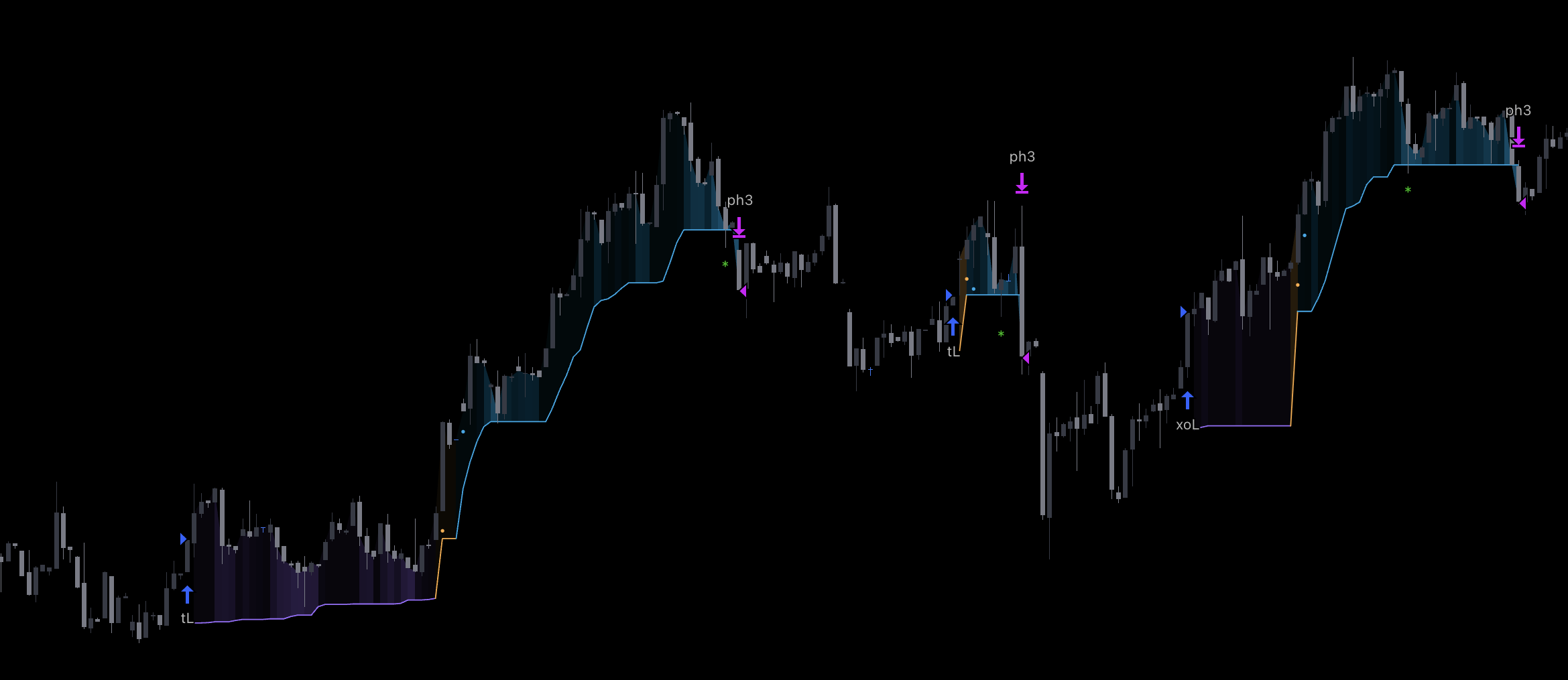
rsk - Your max loss and position size are defined before the trade opens. J-shape volatility-adaptive stop from entry dynamically ratchets up.
be - At 1x profit, stop moves to a smarter break-even, providing space for the trade to develop, hence increasing the chance of reaching phase 3.
atr - atr phase engages once the trade has room to run. Profits only ratchet up, never down.
A redundant Hyperliquid SL at 3x the VWATR stop distance is placed as an exchange-side backup when the position opens.
Your open position in the app automatically changes color based on the active phase: purple during defined risk, amber at break-even ATR, blue when trailing.
Deep Dive: The Exit is the Edge
This article introduces hypr(rsk, be, atr) and walks through how its 3-phase engine sizes and manages a discretionary trade, what to expect when you read the regime right or wrong, and why the builder automated the exits rather than the entries.
How Sizing Works
Two percentages work together. They are not the same thing.
| Input | What it means |
|---|---|
| Risk % Degen 3%|Edge 1.5%|Prop 0.5% | % of your account balance you are willing to lose on this trade |
| Stop % Auto-calculated from VWATR | How far from entry the stop is placed (adapts to each asset's volatility) |
Example: $10,000 balance, Prop 1.5%, SOL with 2.5% VWATR stop
| Step | Value |
|---|---|
| Max loss (1.5% of $10K) | $150 |
| Stop distance (VWATR) | 2.5% from entry |
| Position size ($150 / 2.5%) | $6,000 |
| Stop price (SOL @ $140) | $136.50 |
Wider stop = smaller position. Tighter stop = bigger position. Your dollar risk stays the same.
Auto Trade in 3 Taps
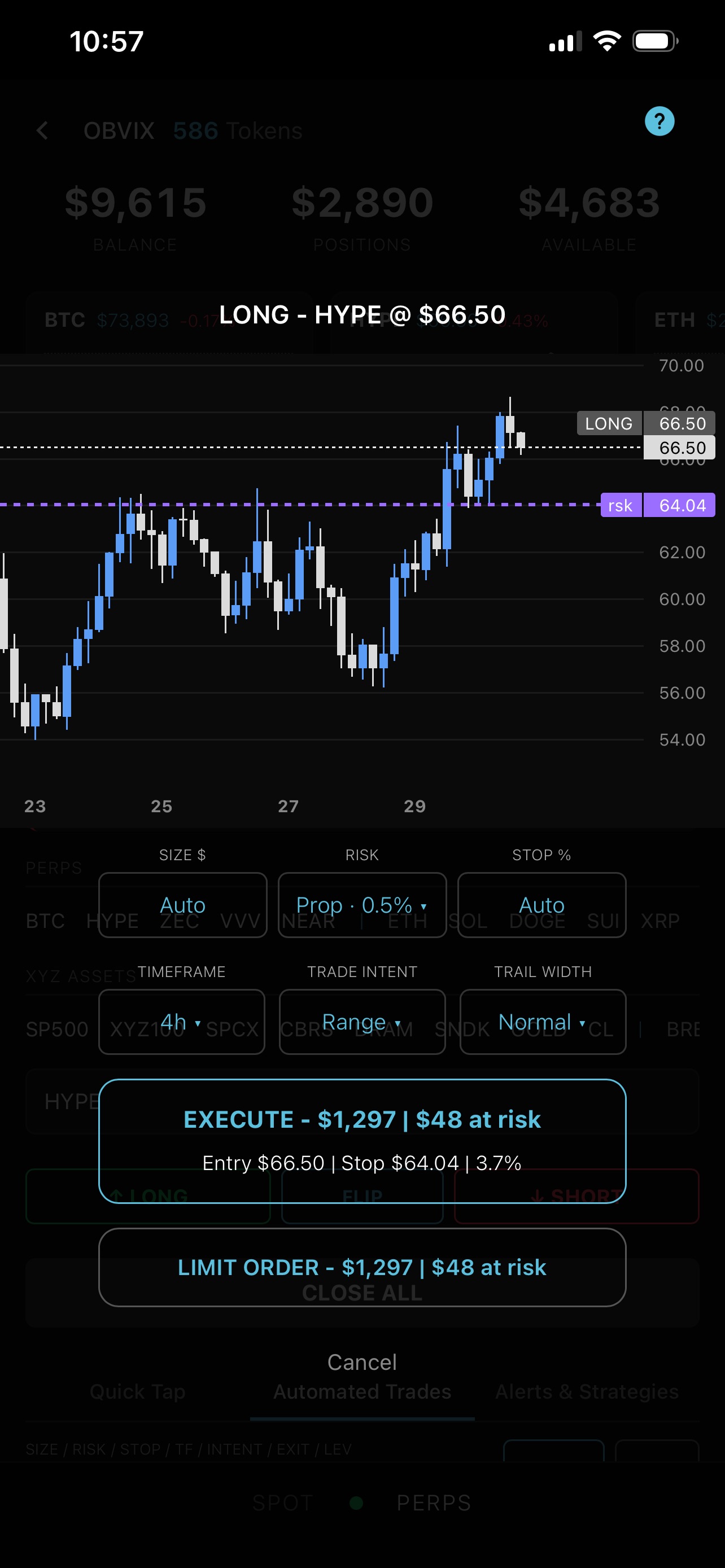
Tap an asset, tap LONG, FLIP, or SHORT, and the order modal shows the risk levels with position sizing and stop placement calculated in real time. Tap Execute and the trade is on.
Quickly validate your trade on the preview-chart with your entry and stop levels; tap the trade header and a full screen chart pops up. The non-obvious gem here is flipping through time frames to see the set-up based on the live condition of the moment. Often times it reveals the truth of the set-up versus the bias or emotions of the moment.
Hold down the execute button and a full customization modal appears. Set exact size, risk %, stop distance, Trade Intent, timeframe, and trail width.
Trade Intent & What to Expect
You choose how you want your trade managed. Scalping is engineered for fast moves you want banked early and minimizing round trips (Popcorn Trades). Range Trading is designed for capturing moves in choppy price action with no clear trend. Trend following allows phase 3 to fully mature, to ride the move and let winners breathe. The system adapts the exit management per your trading intent.
Here is a sequential video of a trade taken on a FOMO high-vol breakout candle on the 5min time frame, NAS100. The system's phase 1 management is the same across all 3 trade intents. This illustrates the difference in how the trade is managed based on the intent the trader selects; remember, intent can be changed mid-flight if you recognize a shift in regime.
- Scalping: One can see how, with the scalp trade intent, the phase trail is pulled into the price action (our secret sauce) to bank the win early and mitigate risk of a popcorn trade.
- Range Trading: Exits at the first sign of a turn typical in a ranging market.
- Trend Following: Surfed the price action, ratcheting up the entire way, and held through liquidity hunts until consolidation emerged.
What Happens in Each Phase
All three scenarios use the same setup: $40,000 account, Prop 0.5% risk profile. SILVER LONG $8,000 @ $80.00, 2.5% VWATR stop distance ($200 risk = 0.5% of account). Stop at $78.00. Backup SL at $74.00.
Phase 2 & 3 have Liquidity Wick Protection - when price wicks through your stop but recovers, the system holds, remaining locked into the trend to maximize profits.
SILVER drops after entry. Price hits $78.00.
Stopped out in rsk phase.
Risk was defined. Loss was contained. No surprises.
SILVER rises to $82.00. Profit reaches 1x risk. Stop moves to break-even ATR level.
Price reverses. SILVER falls back to $80.00.
Stopped out in be phase.
You gave the trade room. It reversed. You lost nothing.
SILVER rises to $84.00. Profit reaches 2x risk. ATR trailing begins from high water mark.
Price continues to $88.00. ATR phase ratchets to $86.20.
Price pulls back. SILVER hits $86.20.
Stopped out in atr phase.
The trail locked in profit while letting the trade run. The bulk of the move was captured without watching the screen.
Automated Trades Tab
The second tab in Settings stores your saved configurations. When a saved setting is active, it pre-loads on every Activate trade. Adjust any value on the fly; it becomes a one-off custom trade without changing your saved defaults.
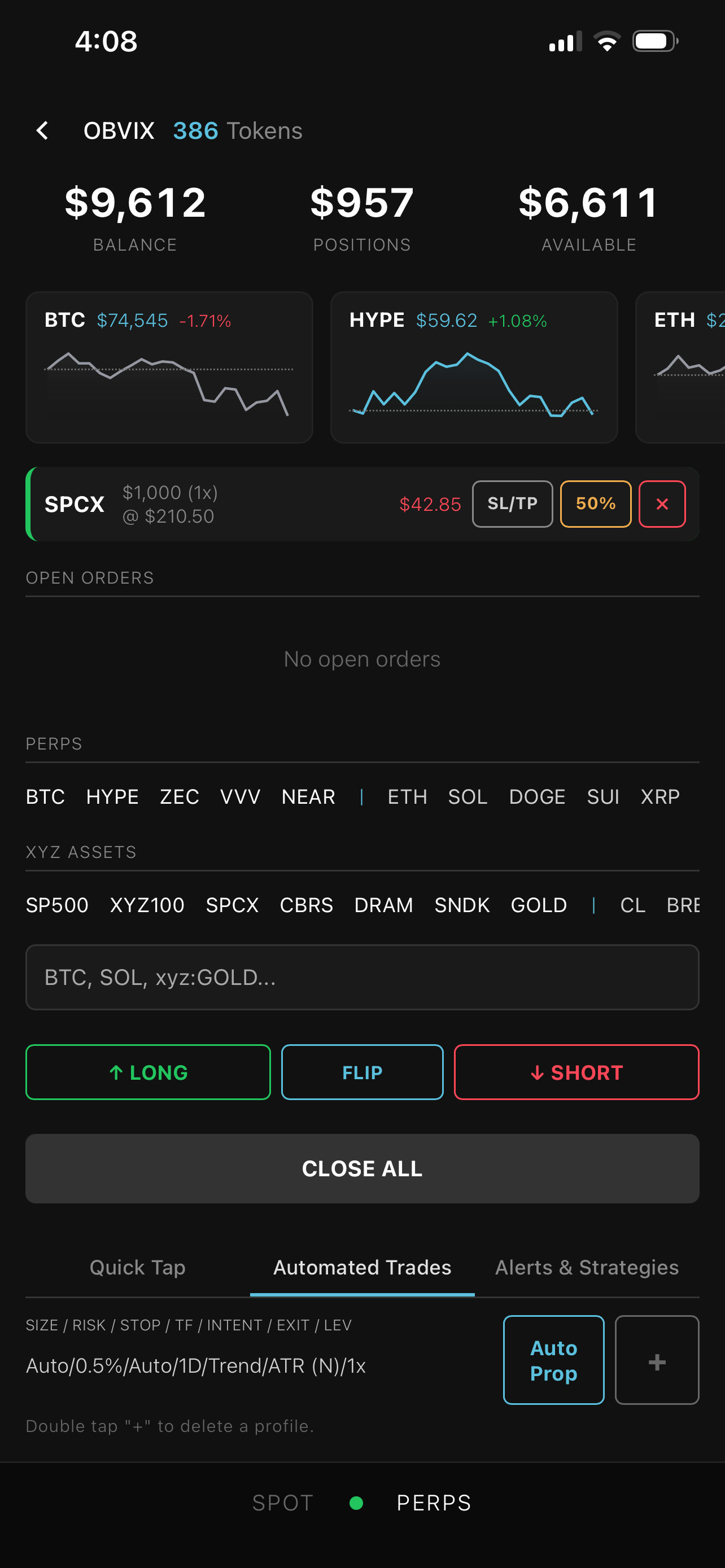
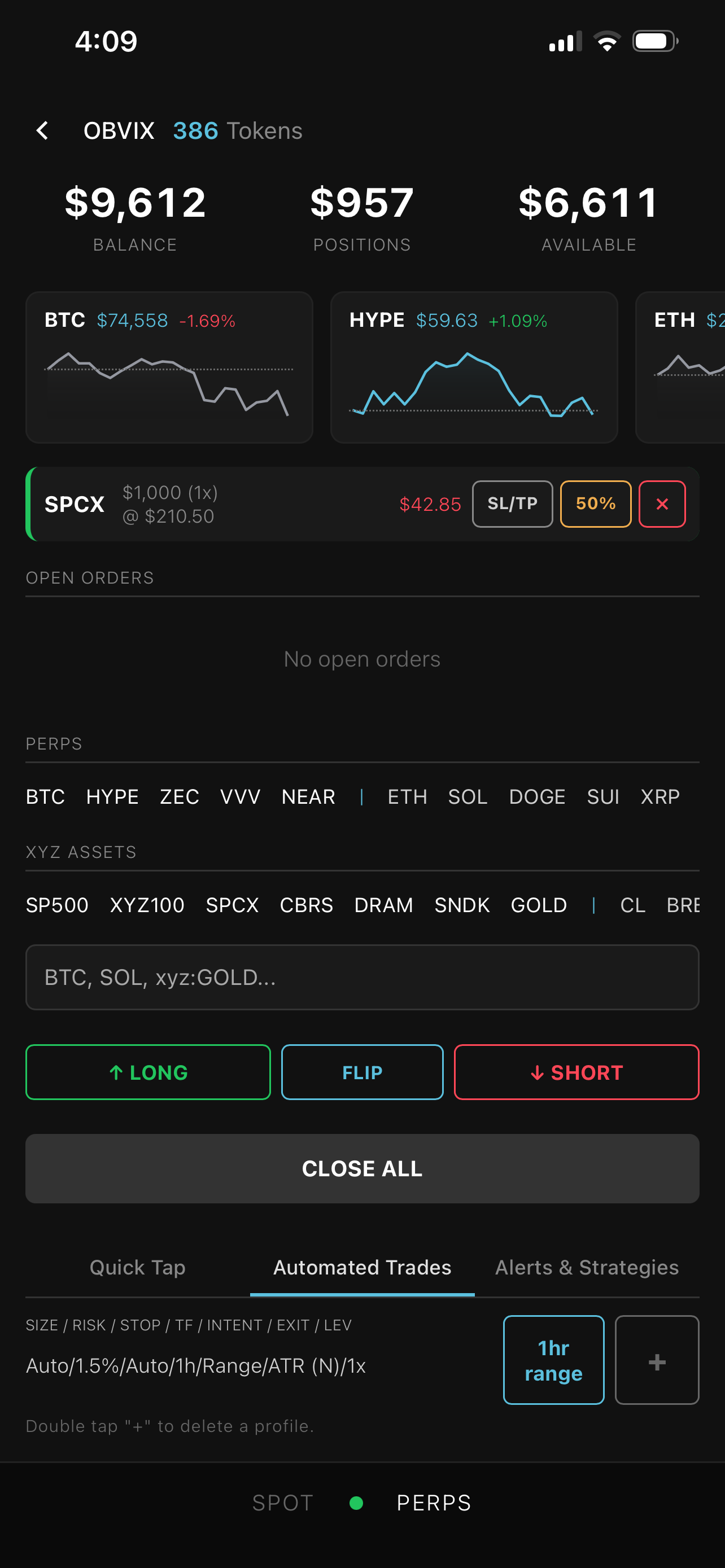
Tap + to create new settings. Double-tap + to delete the selected setting. The dropdown switches between saved configurations instantly.
What Happens When You Pyramid
Adding to a position with the system active: The system resets to phase 1 automatically. Hyperliquid recalculates your average entry for the combined position. The stop, risk, and phases are recalculated from scratch using that new average. Same clean math, applied to the bigger position. New risk, new phase 1.
Adding to a position without the system active: Your existing stop loss is consolidated. The old SL is cancelled and a new one is placed for the total position at the new average entry. One stop loss per ticker, always sized for the full position. You can activate the three-phase system at any point by opening another position with Activate.
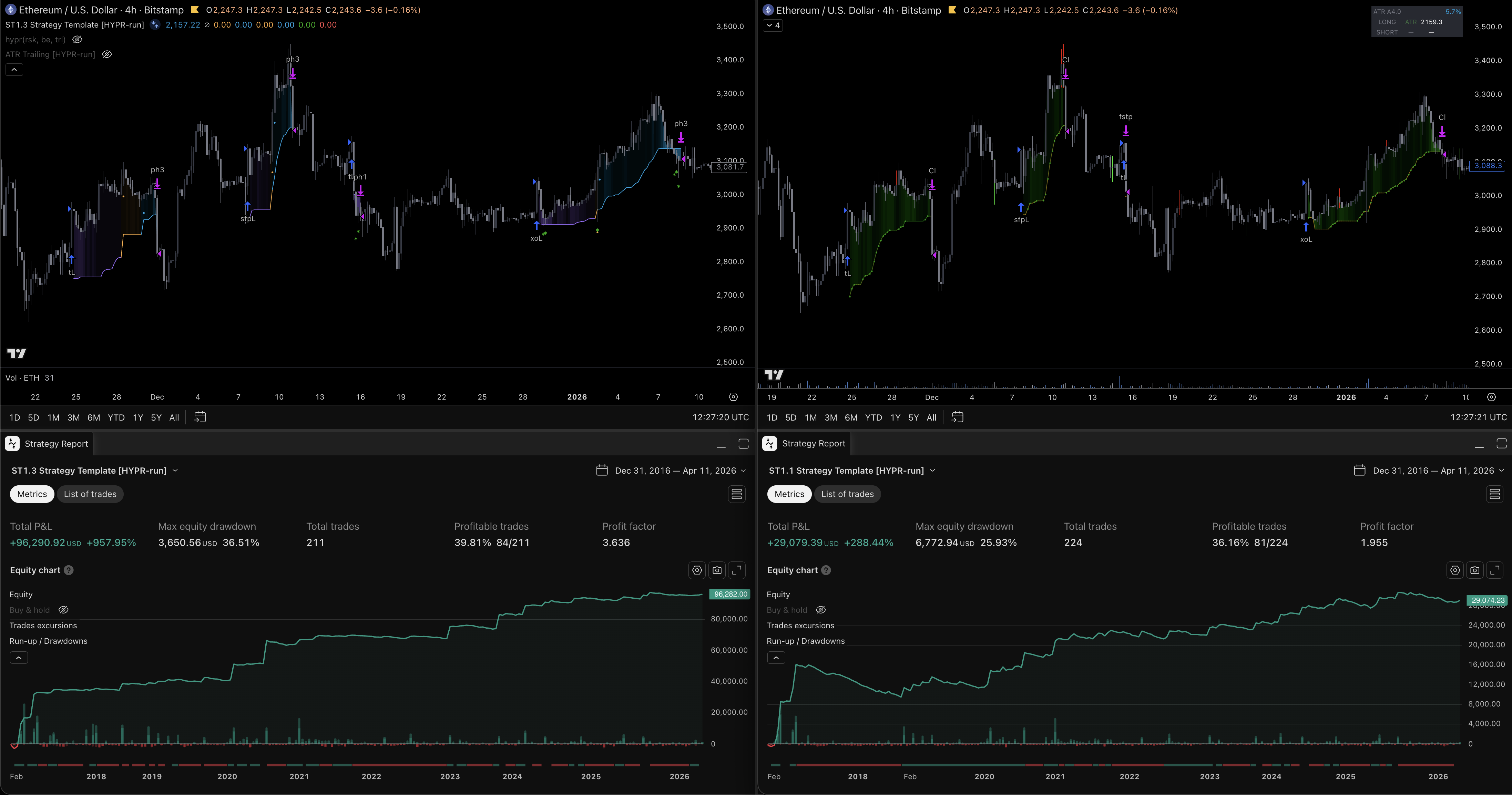
Backtest - Autosizing & 3-Phase System vs Sizing to Static Stops and ATR Trailing
Same entries. Same market.
The same entries are used on both sides. Our system (left) adjusts size and stop based on volatility and volume at the moment of entry, then runs the three-phase exit logic.
The baseline system (right) uses a static 5.5% stop, sizes to that stop, and runs the same ATR trailing as the three-phase system minus the liquidity-hunt filters.
Both start with the same $5,000 balance. The improvement isn't only PnL - profit factor, win rate, and average win/loss ratio all show an edge over the baseline.
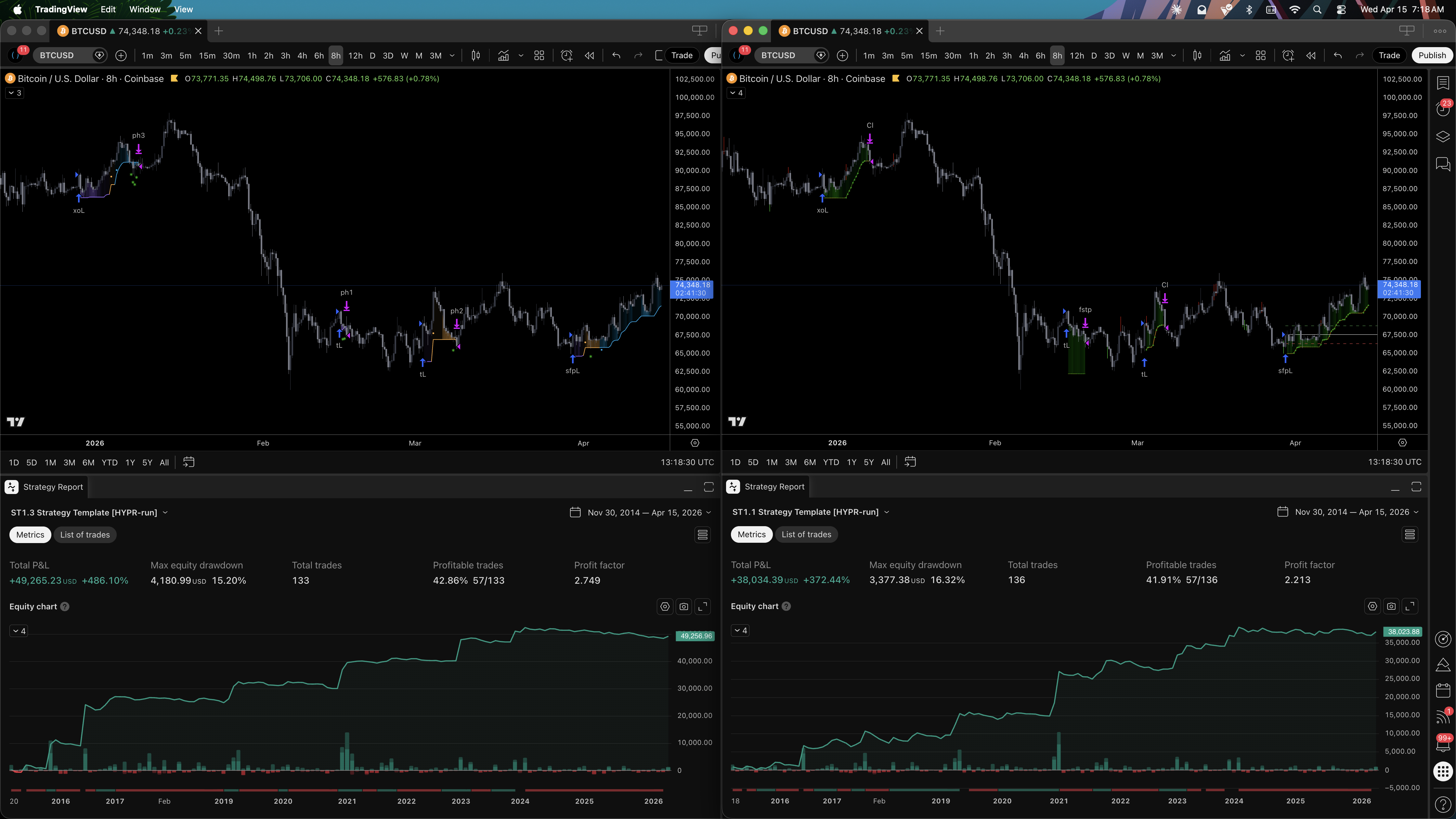
BTC, 8H timeframe